LeadsMCP: Turn AI Into a Live Lead Generation and CRM Workflow

LeadsMCP gives AI agents a practical way to discover live prospects, enrich lead data, control qualified exports and hand contacts off to GoHighLevel. Watch the video below to see how one MCP-ready backend can replace a fragmented chain of prospecting tools.
What Is LeadsMCP?
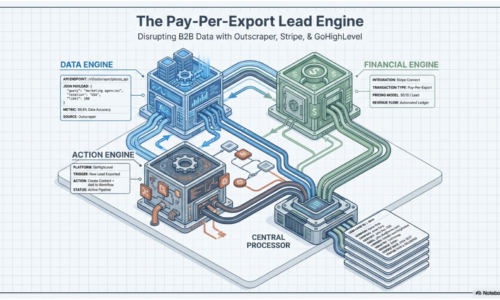
LeadsMCP is a private commercial AI lead generation MCP server designed for live lead operations. It combines lead search and enrichment through Outscraper, customer identity and export metering through Stripe, and structured CRM handoff to GoHighLevel.
Instead of asking someone to jump between a data provider, spreadsheets, billing records and a CRM, an MCP-compatible AI application can access these capabilities through a unified backend. This makes LeadsMCP useful as an infrastructure layer for agencies, RevOps teams, founders and AI operators building repeatable prospecting systems.
Unlike a conventional static contact database, LeadsMCP performs search and enrichment when the workflow runs. Teams can build campaigns around their current targeting requirements instead of depending exclusively on previously assembled lists.
The video demonstrates how an AI-assisted prospecting request can move from a natural-language instruction to an operational lead workflow.
Viewers will see how LeadsMCP can support the following process:
• Translate a prospecting request into a live lead search.
• Retrieve relevant business data through Outscraper.
• Enrich websites and available contact information.
• Preview the results before a qualified export.
• Apply customer identity, export gating and usage metering.
• Send approved lead records into GoHighLevel for follow-up.
This is where AI becomes more operationally useful. Rather than only producing text, an authorized AI agent can help coordinate a defined lead workflow while preserving review points and commercial controls.
How LeadsMCP Works
Live lead discovery
A user or AI agent starts with a target market, such as a business category and location. LeadsMCP connects that request to Outscraper so the workflow can retrieve relevant business information when it is needed.
For an agency, that might mean finding plumbers, roofers or estate agents in a target city. A sales team could use the same process to build a focused prospect list for a particular territory.
Lead enrichment
A company name and address are rarely enough for effective outreach. LeadsMCP supports website and contact enrichment, helping teams turn basic business listings into more useful prospect records. Enrichment also provides a stronger basis for qualification. Operators can inspect available business attributes before deciding which records should enter an outreach or CRM workflow.
Preview before export
LeadsMCP separates initial discovery from the final qualified export. Results can be previewed before billing or CRM synchronization, creating a checkpoint between finding possible leads and treating them as deliverable records. This review-first model helps teams avoid unnecessary exports, verify relevance and control usage. It is more deliberate than automatically sending every result into a sales pipeline.
Stripe usage controls
Stripe provides the commercial layer for customer identity and qualified lead export metering. This is particularly relevant to operators who provide lead-generation services to customers and need measurable, controlled access. These controls allow LeadsMCP to support both internal prospecting and commercial lead services in which eligible exports are associated with the appropriate customer.
GoHighLevel handoff
After leads pass the required checks, LeadsMCP can push structured contact information into GoHighLevel. This provides a direct route from lead discovery to the CRM environment where pipelines, automation and follow-up already happen. A structured CRM handoff reduces copying, spreadsheet management and repeated CSV imports. It also makes prospecting workflows easier to reproduce across campaigns and client accounts.
Why Use MCP?
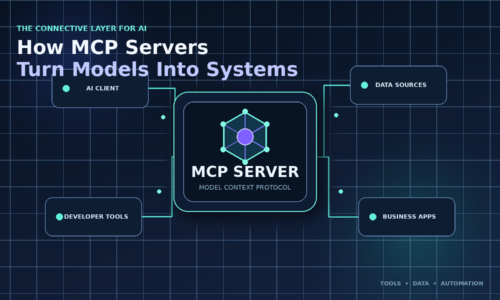
The Model Context Protocol gives compatible AI applications a standardized way to connect with external tools and data. In a lead-generation context, its practical value is orchestration: an AI agent can use approved search, enrichment, billing and CRM capabilities without every client needing an entirely separate workflow.
The approach offers several practical advantages:
• One connected workflow: Discovery, enrichment, export controls and CRM handoff operate through one MCP-ready service.
• Natural-language access: Users can initiate prospecting tasks from a compatible AI interface.
• Reusable infrastructure: Multiple approved clients or agents can connect to the same controlled backend.
• Centralized governance: Credentials, permissions and commercial rules are not scattered across manual processes.
• Human review points: Operators can review records before actions involving cost or CRM changes.
MCP does not make lead quality automatic. Targeting criteria, data availability, qualification rules and human review still determine whether a prospect is useful.
Who LeadsMCP Is For?
Lead generation agencies
Agencies can use LeadsMCP as private infrastructure for finding prospects, reviewing candidate records and handing qualified leads into GoHighLevel. Its customer-aware controls are also suited to services delivered across multiple accounts.
RevOps teams
Revenue teams can use live search and enrichment for territory research, account discovery and focused outbound campaigns. CRM handoff keeps approved prospect data close to the workflows sales representatives already use.
AI automation builders
Developers and AI operators can connect MCP-compatible clients to a backend designed specifically for lead operations. This avoids rebuilding separate integrations whenever a new AI interface or agent is introduced.
Founders
Founders developing lead products can use customer-owned service accounts, controlled exports and private deployment instead of depending completely on a shared, seat-based prospecting platform.
Product Demo Calendar:
Related Posts