Keyword Research for Local Business
- Chad
- July 11, 2026
- SOP
- Keyword Research
- 0 Comments

Research a list of keywords that are relevant to your business and inform your local SEO strategy.
| Last Updated / Reviewed: 07/16/2025 | Execution Time: 15 – 30 Mins |
| 🚀 Goal: Research a list of keywords that are relevant to your business and make informed decisions for your local SEO strategy. |
| 🤞 Ideal Outcome: A complete list of keywords that are relevant to the product or service you sell in locations you’re offering. |
| 🤔 Why this is important: To understand what potential customers type into search engines like Google when looking for your business’ products or services, so, you can tailor your marketing strategy for them. |
| 🧐 Where this is done Google Keyword Planner. |
| 🗓️ When this is done: In the early stage of marketing your business. |
| 👨 Who does this: Marketing manager, marketing consultant, or any person responsible for marketing strategy for your local business. |
| ⚠️Prerequisites or requirements: You will need a Google Keyword Planner account. If you don’t have one, sign up for free here. |
Click here to get the most up-to-date version of this SOP
Identify core services keywords
01▸ Make a copy of this Template 046: Local Keyword Research Template (web version).
02▸ In the first row, replace “Type of Service” with all types of service or product you’re offering.
We’ll be using CarpetBright as an example. CarpetBright is a carpet cleaning service located in the UK.
Hover over their navigation, and you’ll find a list of cleaning services they provide.

03▸ In the Template 046: Local Keyword Research Template (web version), we will replace “Type of Service” with the services as depicted in the screenshot below.
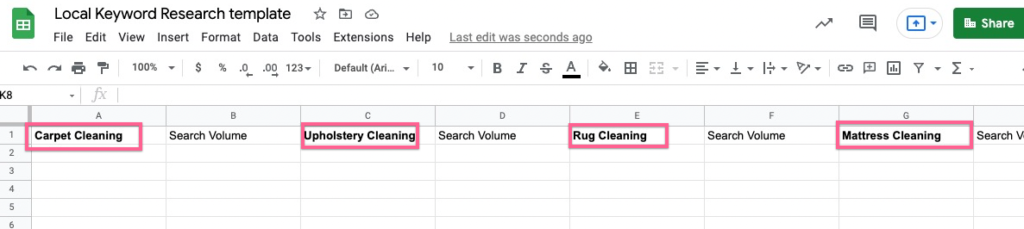
You now have a list of seed keywords to build upon.
Generate keyword Ideas using keyword planner
01▸ First, identify all the locations (cities and towns) where you provide your service or sell your products. For example, CarpetBright provides its services in 5 major cities in the UK, including Bromley, Croydon, Kent, London, and Surrey.

02▸ We will then append the type of service you provide + the location keywords:
- Carpet Cleaning London
- Carpet Cleaning Bromley
- Carpet Cleaning Croydon
- Carpet Cleaning Kent
- Carpet Cleaning Surrey
03▸ Then sign in to your Google keyword planner account.
04▸ Select “Discover new keywords”.

05▸ Next, (a) add the expanded keywords in the search field under “Start with keywords”.
06▸ (b) Make sure the location and language are set based on where your local business is located.
07▸ (c) Click “Get Results”.

You will then get a list of local keywords that are relevant to your business and the location you’re offering your service/product.
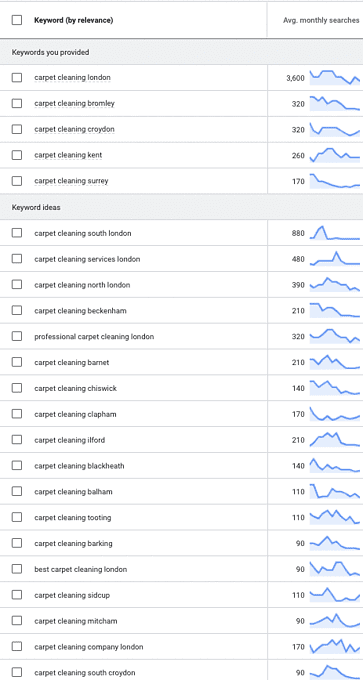
08▸ Export the list of keywords as a spreadsheet and open the sheet in a new tab.
09▸ The only columns we’re interested in are the “Keyword” and “Avg. Month Searches” columns.
10▸ Delete every other column by right-clicking the column label and selecting “Delete Column”.

The result should look something like this:

Copy and paste all these keywords into the local keyword research template.
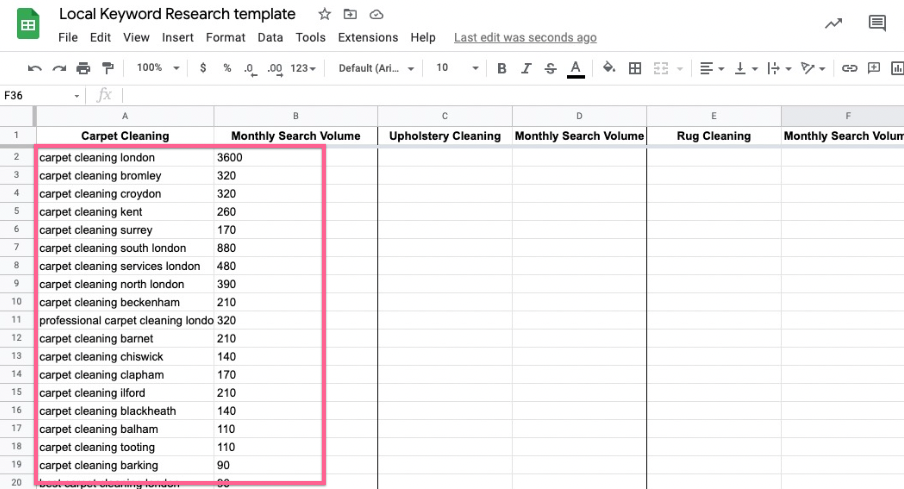
Repeat steps 2-13 for every type of service/product you’re offering.
Your template should now be completed with all the local keywords:

Trimming down the keywords
In most cases, Google Keyword Planner will generate hundreds or thousands of keywords. Not every keyword will be relevant to you or your business, so, it’s best to just remove them from the spreadsheet.
Remove keywords that are not relevant to your business:
- Product or service you don’t provide — For example, if CarpetBright doesn’t provide carpet steaming service, then remove “steam carpet cleaning london” from the keyword list.
- Location where you don’t provide your service — For example, if CarpetBright doesn’t provide service in West London, then remove “carpet cleaning west london” from the keyword list.
- Keywords that are irrelevant to the product or service — For example, “magic carpet cleaning london” is not relevant to the business.
- Competitor’s brand keyword — For example, Chemdry is a competitor, so remove “Chemdry London” from the list.
You now have a completed list of keywords to inform your local SEO strategy, such as SOP 018: Perform on-page optimization on a WordPress post with Yoast (web version), new content ideas, etc. That’s it, you’re good